Arranger
Type-safe Rich Text Editor Engine for Compose Multiplatform.
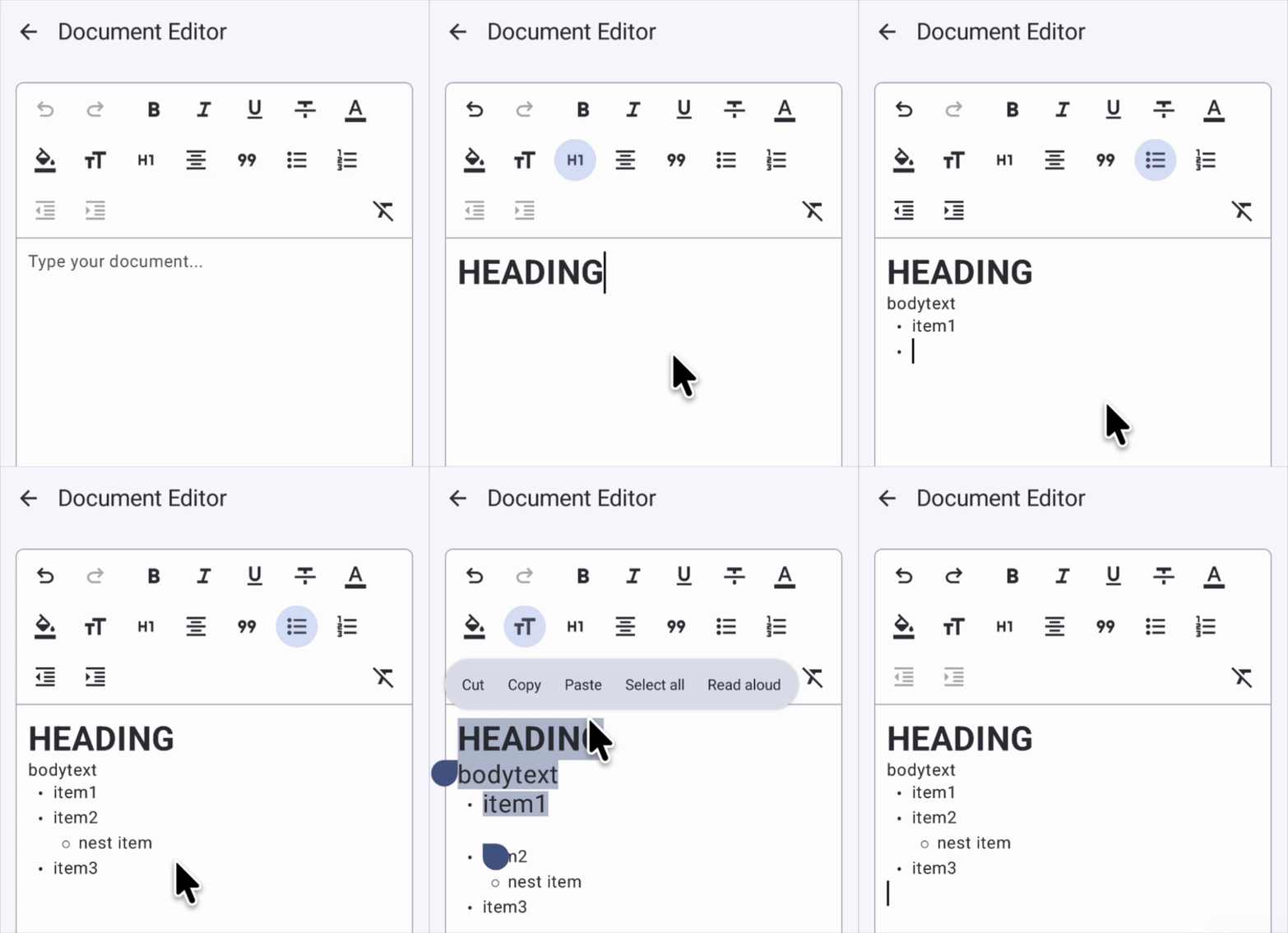



Arranger is a declarative, type-safe rich text editor engine and UI framework designed for Compose Multiplatform (Android, Desktop JVM, iOS, Web/WasmJs).
Much like ProseMirror and Lexical in the web ecosystem, Arranger provides the robust foundational layer required to build modern rich document editing experiences (such as Notion, Bear, or Slack-like editors) natively in Compose.
Key Features
✍️ Polished Editor Experiences
- Dual Editor Components:
RichTextEditorfor toolbar-driven rich editing andWysiwygEditorfor real-time Markdown shortcut styling while typing. - Intuitive Undo / Redo: Full tracking of both text edits and formatting mutations with native keyboard shortcut support (Cmd/Ctrl + Z, Shift + Cmd/Ctrl + Z).
- Smart Enter Key Handling: Automatic heading reset, list continuation, and multi-level outdenting via
EnterKeyStrategy. - Interactive Spans: Tap detection (
onSpanClick) for mentions, hashtags, and hyperlinks with cursor movement suppression (event.consume()). - Autocomplete Support: Input query detection for
@mentionsand#tagswith zero-calculation cursor-following popup positioning (createPopupPositionProvider).
🛡️ Type-Safe & Declarative Core Engine
- Index-Free Mutation DSL: Atomic, index-safe text and attribute editing via
state.edit { ... }without manual offset arithmetic. - Semantic Attribute Queries ("Runs"): Extraction and batch transformation of contiguous styled text ranges inspired by SwiftUI
AttributedString.Runs. - Extensible Custom Attributes: Compile-time type-safe
AttributeKey<T>system for custom styles and domain metadata. - Exclusive Paragraph Categorization: Automatic mutual exclusion between headings, blockquotes, and lists, as well as horizontal text alignments.
🌐 Interoperability & Ecosystem
- Bidirectional Markdown & HTML Conversion: Reversible import and export with external formats via
:richtext-markdownand:richtext-html. - Material 3 Design System Integration: Native alignment with
MaterialThemeTypography and ColorScheme via:richtext-editor-material3. - Full Kotlin Multiplatform Conformance: Identical behavior and architecture across Android, macOS, Windows, Linux, iOS, and Web (WasmJs).
Why Arranger?
Compose Foundation (1.12+) provides low-level primitives such as BasicTextField and addStyle, but building a practical document editor surfaces numerous architectural challenges:
- Index Synchronization Complexity: Manually recalculating span start and end offsets across insertions and deletions.
- Paragraph Boundaries & Formatting Inheritance: Managing formatting reset upon newlines, heading dismissal, and nested list indentation.
- Atomic State Synchronization & Undo History: Atomically undoing and redoing simultaneous plain-text edits and styling mutations.
Arranger resolves these complexities deep inside the core engine, exposing a clean, expressive API to developers.
// Arranger: Declarative, safe text and style mutation DSL
state.edit {
    insert(index = textLength, text = "New Chapter Title\n") {
        bold()
        headingLevel(HeadingLevel.H2)
    }
}
// Semantic batch editing with Runs: change all bold ranges to red text
state.edit {
    val boldRuns = state.richString.runs(BoldKey)
    editAll(boldRuns) {
        textColor(Color.Red)
    }
}
Quick Look
Getting started with Arranger requires only a few lines of code in Compose:
@Composable
fun MyEditor() {
    val state = rememberRichTextState()

    Column(modifier = Modifier.fillMaxSize().padding(16.dp)) {
        // Toggle bold formatting for current selection or typing position
        Button(onClick = { state.toggleSpanAttribute(BoldKey) }) {
            Text("Bold")
        }

        // Full-featured rich text editor component
        RichTextEditor(
            state = state,
            modifier = Modifier.fillMaxWidth().weight(1f),
        )
    }
}
Documentation Guide
Explore Arranger's capabilities by topic:
- Installation Guide: Gradle dependency setup (KMP, Android, Version Catalog) and supported platforms.
- Quick Start: Step-by-step tutorial to build an interactive rich text editor with toolbars.
- RichTextEditor Basics: In-depth guide to the standard editor component and its customization options.
- WysiwygEditor Basics: Real-time Markdown shortcut styling editor component.
- State Management:
RichTextState, typing attributes, and robust undo/redo history. - Spans and Paragraphs: Inline span attributes vs block paragraph attributes and snapping rules.
- Built-in Attributes: Standard attributes for bold, italic, text color, headings, lists, and alignments.
- Custom Attributes: Defining domain-specific attributes (e.g. mentions, comments) and custom style resolvers.
- Theming and Material 3: Dynamic styling via
AttributeStyleResolverand Material 3 design token integration. - Architecture Overview: High-level system structure, modular artifacts, and design principles.
- API Reference: Complete Dokka KDoc reference across all Arranger artifacts.