List Handling & Markers
Arranger features native support for hierarchical bulleted and numbered (ordered) lists across all supported platforms (Android, iOS, Desktop, and Web).
List styling in Arranger is built upon paragraph-level attributes combined with semantic marker resolution and automatic visual indent calculations.
Core List Attributes
Arranger defines two block-level list attributes in :richtext:
BulletListKey:BlockTypeAttributeKey<ListIndentLevel>OrderedListKey:BlockTypeAttributeKey<ListIndentLevel>
Both keys take a ListIndentLevel value:
Indentation depth maps directly to start padding in Compose UI via toIndent():
| Indentation Level | Visual Indent (sp) |
Default Bullet Symbol | Ordered Numbering |
|---|---|---|---|
Level1 |
24.sp |
• (Solid circle) |
1., 2., 3. |
Level2 |
48.sp |
○ (Open circle) |
1., 2. (Nested reset) |
Level3 |
72.sp |
▪ (Square) |
1. |
Level4 |
96.sp |
▪ (Square) |
1. |
Level5 |
120.sp |
▪ (Square) |
1. |
Level6 |
144.sp |
▪ (Square) |
1. |
Unspecified |
0.sp |
None | None |
Visual Demos
Bullet Lists
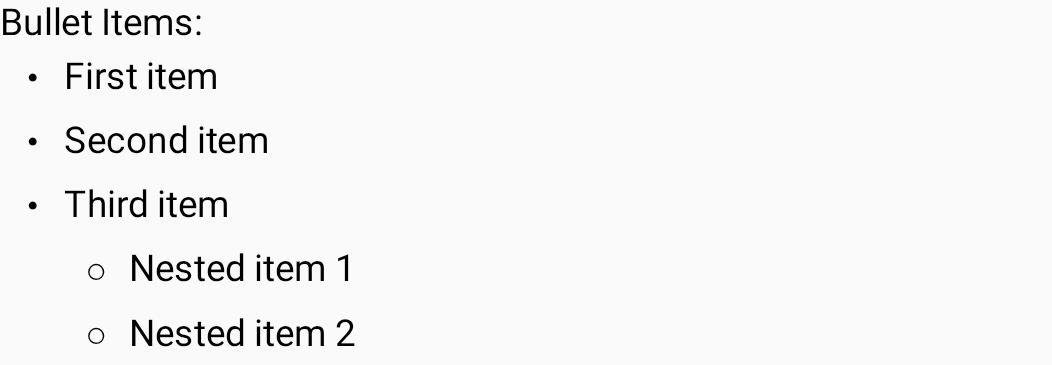
Hierarchical bullet lists automatically switch marker symbols according to indentation level.
Ordered Lists
Ordered lists dynamically calculate numbering runs per paragraph run and restart numbering at 1. for child indentation levels or disconnected blocks.

Custom List Markers
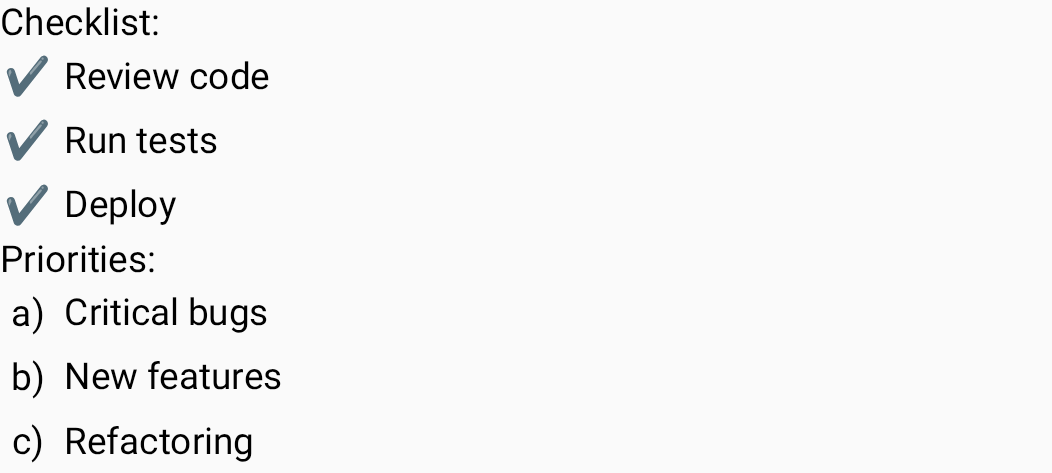
Custom markers (such as checkmarks, arrows, alphabetical indices a., b., or Roman numerals) can be plugged in seamlessly.
Semantic Model: ListItem & Item Extraction
Arranger separates list semantics from text drawing using the ListItem model:
public sealed interface ListItem {
    public val textIndex: Int
    public val indentLevel: ListIndentLevel
    public val color: RgbaColor?
}

public data class BulletListItem(
    override val textIndex: Int,
    override val indentLevel: ListIndentLevel,
    override val color: RgbaColor?,
) : ListItem

public data class OrderedListItem(
    override val textIndex: Int,
    override val indentLevel: ListIndentLevel,
    override val color: RgbaColor?,
    val index: Int, // 1-based sequential number
) : ListItem
Automatic Numbering Counter
Arranger automatically computes sequential indices for OrderedListItem:
- Maintains an array of counters across all indent levels (
IntArray(ListIndentLevel.entries.size) { 1 }). - Increments the counter for each paragraph within the continuous ordered list run.
- Automatically resets deeper levels back to
1when stepping out to a higher level. - Resets all counters if an ordered list is interrupted by standard paragraphs or other block types.
ListMarkerResolver
ListMarkerResolver is a functional interface responsible for rendering the prefix string prepended to each list item in the editor:
DefaultListMarkerResolver
The built-in default resolver provides standard symbols:
public val DefaultListMarkerResolver: ListMarkerResolver =
    ListMarkerResolver { item ->
        when (item) {
            is BulletListItem -> {
                when (item.indentLevel) {
                    ListIndentLevel.Level1 -> "・"
                    ListIndentLevel.Level2 -> "○"
                    else -> "▪"
                }
            }
            is OrderedListItem -> {
                "${item.index}."
            }
        }
    }
Custom List Markers
You can provide a bespoke ListMarkerResolver to RichTextEditor or WysiwygEditor:
val customMarkerResolver = ListMarkerResolver { item ->
    when (item) {
        is BulletListItem -> "✔️ "
        is OrderedListItem -> {
            // Alphabetical list: 1 -> 'a.', 2 -> 'b.', etc.
            val letter = 'a' + item.index - 1
            "$letter) "
        }
    }
}

RichTextEditor(
    state = state,
    listMarkerResolver = customMarkerResolver,
    modifier = Modifier.fillMaxWidth()
)
Indentation Controls: Outdent and Indent
You can adjust list indentation programmatically or wire toolbar buttons to increment or decrement ListIndentLevel:
// Indent deeper (e.g. Level1 -> Level2)
fun indentList(state: RichTextState) {
    val currentLevel = state.currentAttributes[BulletListKey]
        ?: state.currentAttributes[OrderedListKey]
    if (currentLevel != null && currentLevel.ordinal < ListIndentLevel.Level6.ordinal) {
        val nextLevel = ListIndentLevel.entries[currentLevel.ordinal + 1]
        if (state.currentAttributes.containsKey(BulletListKey)) {
            state.applyFormat(BulletListKey, nextLevel)
        } else {
            state.applyFormat(OrderedListKey, nextLevel)
        }
    }
}

// Outdent (e.g. Level2 -> Level1, or Level1 -> remove list)
fun outdentList(state: RichTextState) {
    val currentLevel = state.currentAttributes[BulletListKey]
        ?: state.currentAttributes[OrderedListKey]
    if (currentLevel != null && currentLevel.ordinal > 0) {
        val prevLevel = ListIndentLevel.entries[currentLevel.ordinal - 1]
        if (state.currentAttributes.containsKey(BulletListKey)) {
            state.applyFormat(BulletListKey, prevLevel)
        } else {
            state.applyFormat(OrderedListKey, prevLevel)
        }
    } else if (currentLevel != null) {
        state.removeFormat(BulletListKey)
        state.removeFormat(OrderedListKey)
    }
}
Handling Keyboard Indent (Tab / Shift-Tab)
To support desktop and hardware keyboard navigation via Tab and Shift+Tab, attach an onPreviewKeyEvent modifier to the editor:
Modifier.onPreviewKeyEvent { event ->
    if (event.type == KeyEventType.KeyDown && event.key == Key.Tab) {
        val hasList = state.currentAttributes.containsKey(BulletListKey) ||
            state.currentAttributes.containsKey(OrderedListKey)
        if (hasList) {
            if (event.isShiftPressed) {
                outdentList(state)
            } else {
                indentList(state)
            }
            true // Consume event so focus does not leave editor
        } else {
            false
        }
    } else {
        false
    }
}
Summary
- Bullet and ordered lists use
ListIndentLevel(Level1toLevel6). - Automatic sequential numbering is computed per ordered list run with automatic hierarchical counter resets.
- Customize marker bullets or numbered formats by supplying a custom
ListMarkerResolver. - Pair with
ListEnterStrategyto give users seamless Enter, Backspace, and Tab editing workflows.