Quick Start
Get started with Arranger in just a few lines of Compose code. This guide walks through rendering a rich text editor, applying initial styles, and observing automatic span tracking.
Minimal Editor Component
To start, create a minimal Composable rendering an empty editor.
@Composable
fun SimpleEditor() {
    // 1. Remember RichTextState to manage editor state (survives Android configuration changes)
    val state = rememberRichTextState()

    // 2. Render RichTextEditor passing state
    RichTextEditor(
        state = state,
        modifier = Modifier
            .fillMaxSize()
            .padding(16.dp),
    )
}
With just this setup, you have a fully functional rich text editor supporting keyboard input, cursor navigation, and text selection.
Setting Initial Content and Styles
To pre-populate the editor with formatted text upon launch, use RichString and its mutation DSL (edit { ... }).
@Composable
fun DynamicEditingSample(modifier: Modifier = Modifier) {
    val initialText = "Edit this styled text to see the magic."

    // 1. Create RichTextState with initial text and formatting
    val state = rememberRichTextState(
        initialText = RichString(text = initialText).edit {
            // Safely locate occurrences of "styled text" and apply bold and purple color
            editAttributes(range = initialText.rangeOf("styled text")) {
                bold()
                textColor(Color(0xFF6200EA)) // Purple
            }
        },
    )

    // 2. Render editor
    RichTextEditor(
        state = state,
        modifier = modifier
            .fillMaxWidth()
            .padding(16.dp),
    )
}
Dynamic Typing & Automatic Span Shifting
Run the example above and try typing characters inside or deleting characters around "styled text".
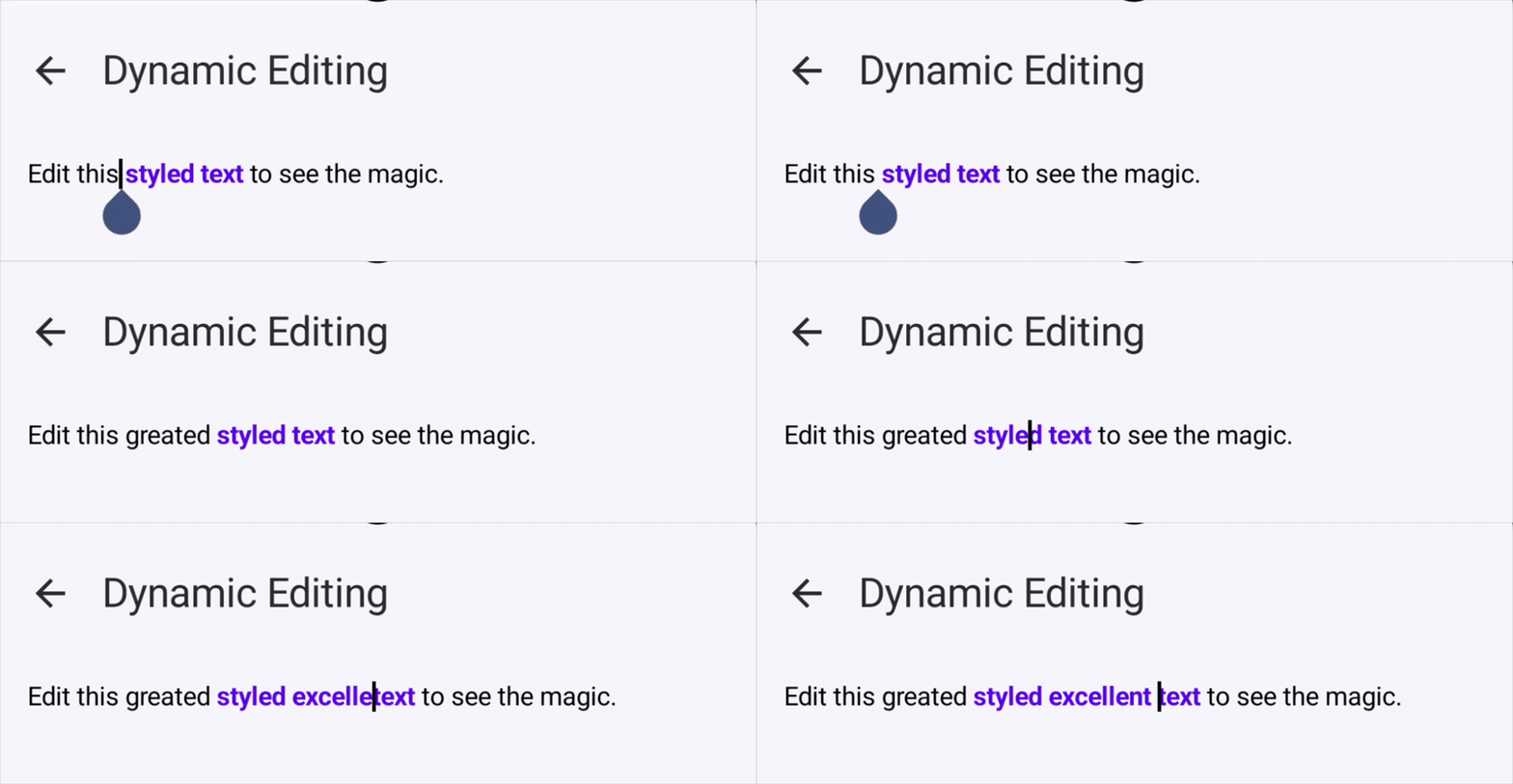
As you type, the editor engine diffs text mutations in real time and automatically shifts and stretches existing span boundaries:
- Typing inside formatted ranges: Formatting automatically extends to newly inserted characters.
- Typing outside formatted ranges: Existing span offsets shift forward or backward safely without corruption.
Reading State & Programmatic Mutation
Inspecting Plain Text and Spans
You can read the entire current text or inspect applied spans as immutable data structures via state.richString at any time.
// Retrieve plain text
val currentPlainText: String = state.richString.text

// Inspect formatted spans
val currentSpans = state.richString.spans
println("Active span count: ${currentSpans.size}")
Programmatic Atomic Mutations
To mutate text or styling from external UI events (such as button clicks or menu actions), call state.edit { ... }.
// Append bold red text to the end of the document
state.edit {
    insert(index = textLength, text = " Appended bold text") {
        bold()
        textColor(Color.Red)
    }
}
Mutations within an edit block execute atomically and are recorded as a single operation in the undo/redo history.
Next Steps
Now that you have the basic editor running, explore the following guides to take full advantage of Arranger:
- RichTextEditor Parameter Reference: In-depth guide to decorators, style resolvers, and click event callbacks.
- WysiwygEditor Guide: Real-time Markdown shortcut styling while typing.
- State Management Architecture: Typing attributes, undo/redo history, and selection attribute queries.
- Built-in Attributes Reference: Standard attributes for headings, lists, blockquotes, colors, and more.