Autocomplete & Mentions
Arranger provides a built-in autocomplete engine designed specifically for rich text editors. It enables effortless implementation of:
- @mentions for team members and users
- #hashtags and channels
- :emoji: shortcodes
- Custom slash-commands (such as
/h1,/bullet, or/code)
The engine provides full trigger detection, query extraction, atomic completion replacement, and zero-calculation cursor popup positioning that accounts for scrolling, keyboard insets, and window constraints.
Visual Demos
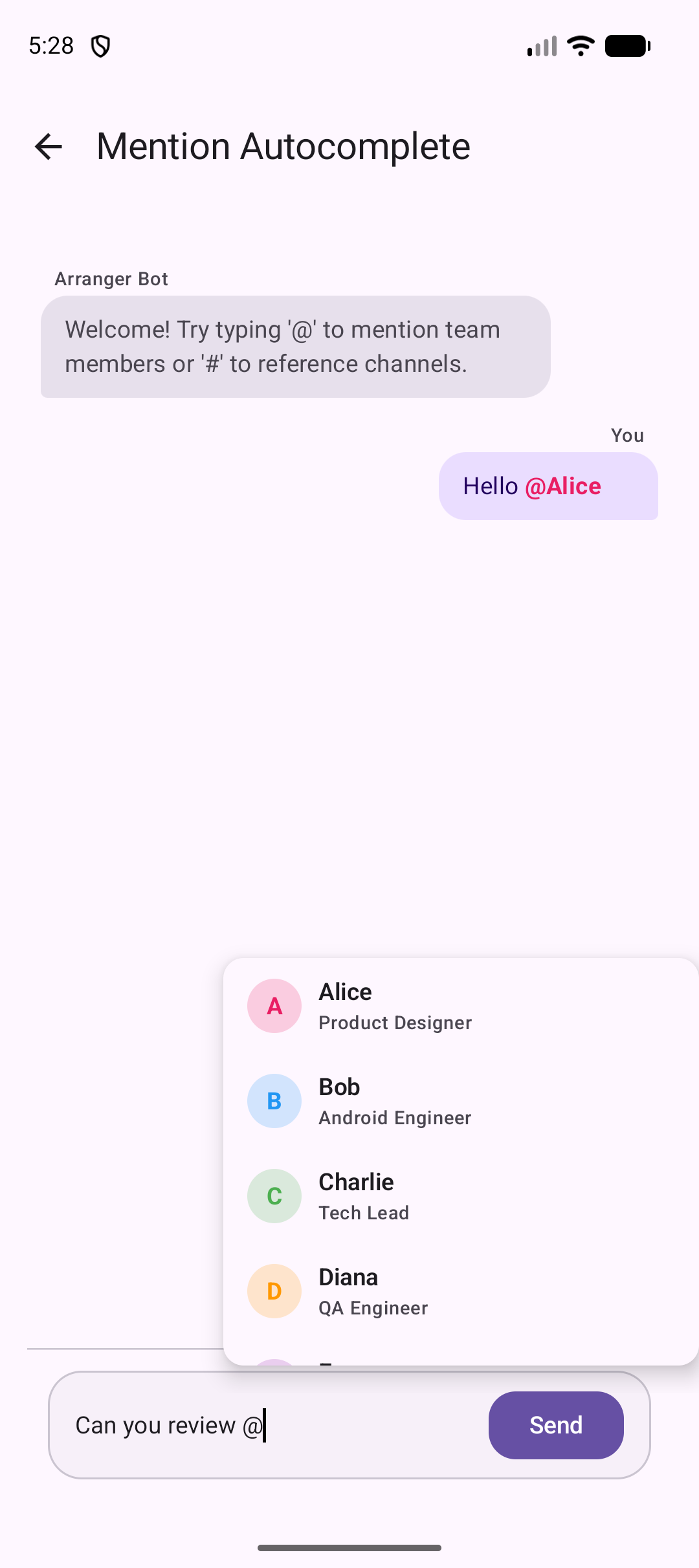
Mention Autocomplete
Typing @ followed by a user's name displays an elevated popup positioned directly below the active cursor. Selecting a user inserts a stylized mention badge.
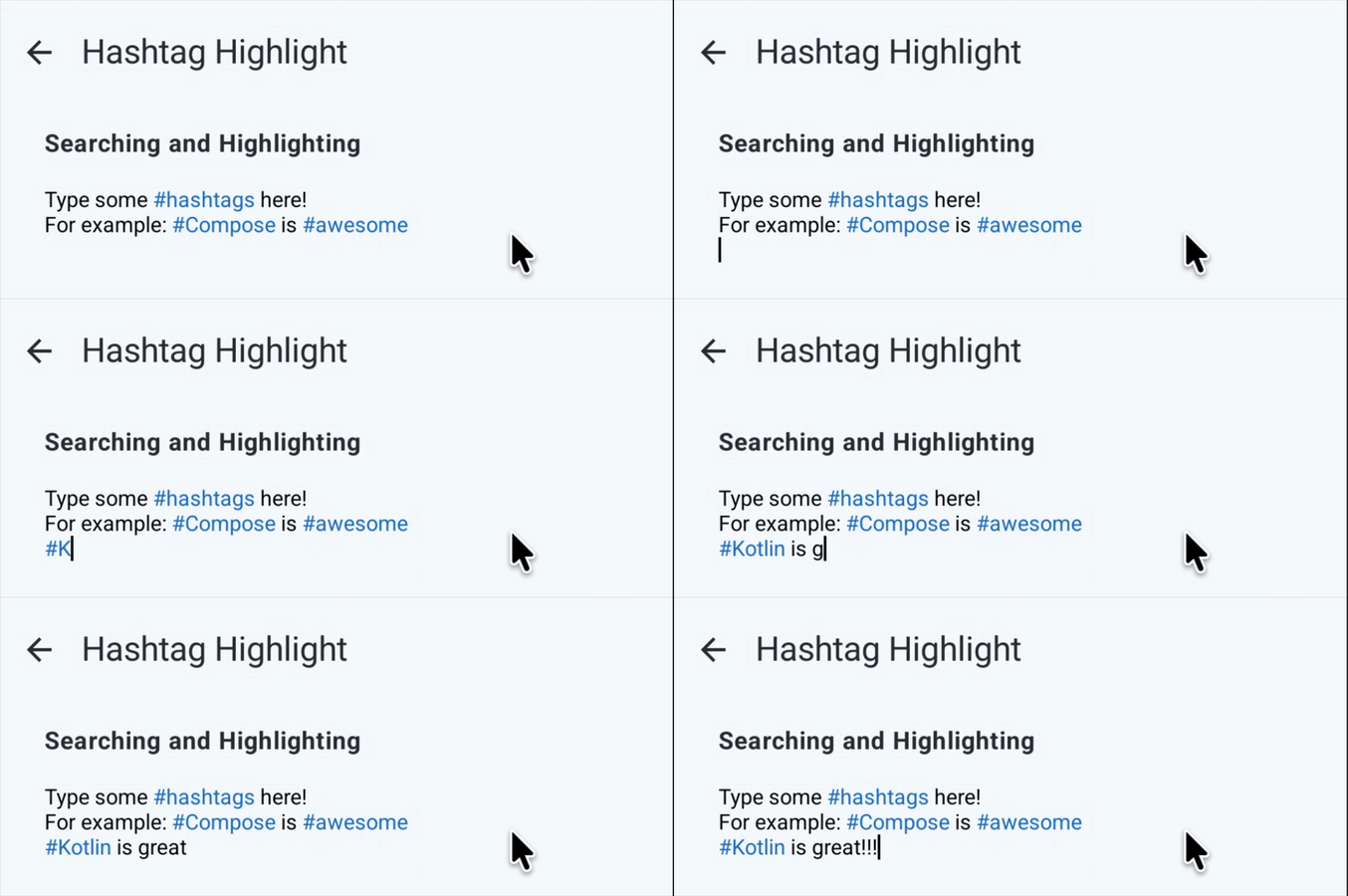
Hashtag Trigger
Hashtag detection works in real time, highlighting matching tags and channels as you type.
Configuring Triggers
Define triggers using AutocompleteTrigger for each pattern your editor supports (such as @ for mentions or # for channels):
val triggers = listOf(
    // Trigger for user mentions (e.g. @alice)
    AutocompleteTrigger(prefix = "@"),
    // Trigger for full names allowing spaces (e.g. @Jane Doe)
    AutocompleteTrigger(prefix = "@", allowSpacesInQuery = true),
    // Trigger for channel/topic hashtags (e.g. #general)
    AutocompleteTrigger(prefix = "#"),
)
Key Trigger Options
prefix: The triggering character or string (e.g."@"or"#").requireLeadingWhitespace: Whentrue(default), prevents false triggers inside words (e.g.user@example.comwill not trigger mention autocomplete).allowSpacesInQuery: Set totruefor queries with spaces, such as full names (@Jane Doe). By default (false), typing a space automatically dismisses the popup.maxQueryLength: Upper limit on query length (default50). Typing beyond this limit dismisses the popup.
For detailed constructor signatures, refer to the AutocompleteTrigger API Reference.
Receiving Autocomplete Matches
Pass your triggers to RichTextEditor(autocompleteTriggers = triggers, onAutocompleteChange = { match -> ... }).
When an active trigger matches the cursor position, Arranger delivers an AutocompleteMatch containing:
match.query: The query text typed after the prefix (e.g."ali"in"@ali").match.range: The full character range in the document including the prefix (5..9).match.queryRange: The character range of the query alone (6..9).match.cursorRect: The bounding box of the cursor, used for popup positioning.
When the cursor leaves the trigger area, onAutocompleteChange is called with null so you can dismiss suggestions.
Zero-Calculation Cursor Popup Positioning
Positioning popups near an editor cursor usually requires tedious calculation of scroll offsets, window boundaries, and flip logic.
Arranger handles all of this automatically via createPopupPositionProvider():
public fun AutocompleteMatch.createPopupPositionProvider(
    offset: IntOffset = IntOffset.Zero,
): PopupPositionProvider
How It Works Under the Hood
- Reads
match.cursorRectobtained from Compose text layout. - Automatically offsets against editor scroll state.
- Automatically flips the popup above the cursor if there is insufficient vertical space below.
- Clamps the horizontal coordinate to prevent overflowing the left or right edges of the window.
match?.let { currentMatch ->
    Popup(
        popupPositionProvider = currentMatch.createPopupPositionProvider(
            offset = IntOffset(x = 0, y = 8) // Optional extra margin
        ),
        onDismissRequest = { autocompleteMatch = null },
    ) {
        SuggestionPopupContent(match = currentMatch)
    }
}
Applying Completions
When the user selects a suggestion, apply the completion atomically via RichTextState.applyCompletion:
1. Plain Text Replacement
Replaces the trigger and query range with plain text and advances the cursor:
2. Formatted Replacement with Attributes
Replaces the trigger with styled text (for example, a bold and colored mention badge):
state.applyCompletion(
    match = match,
    replacement = "@${user.name} ",
    attributes = attributeContainerOf(
        BoldKey to Unit,
        TextColorKey to user.color.toRgbaColor(),
    )
)
3. RichString Replacement
Replaces the match with a full RichString structure:
Each completion automatically records an isolated Undo step (UndoMergePolicy.Separate), allowing users to revert the completion with a single Undo command.
Complete Working Autocomplete Example
@Composable
fun ChatEditorWithMentions() {
    val state = rememberRichTextState()
    var activeMatch by remember { mutableStateOf<AutocompleteMatch?>(null) }

    val triggers = remember {
        listOf(
            AutocompleteTrigger(prefix = "@"),
            AutocompleteTrigger(prefix = "#"),
        )
    }

    Box(modifier = Modifier.fillMaxWidth()) {
        RichTextEditor(
            state = state,
            autocompleteTriggers = triggers,
            onAutocompleteChange = { match -> activeMatch = match },
            modifier = Modifier.fillMaxWidth().padding(12.dp)
        )

        activeMatch?.let { match ->
            Popup(
                popupPositionProvider = match.createPopupPositionProvider(
                    offset = IntOffset(x = 0, y = 4)
                ),
                onDismissRequest = { activeMatch = null }
            ) {
                ElevatedCard(
                    modifier = Modifier.width(240.dp),
                    shape = RoundedCornerShape(8.dp),
                    elevation = CardDefaults.elevatedCardElevation(defaultElevation = 6.dp)
                ) {
                    if (match.trigger.prefix == "@") {
                        val candidates = listOf("Alice", "Bob", "Charlie")
                            .filter { it.contains(match.query, ignoreCase = true) }

                        LazyColumn {
                            items(candidates) { name ->
                                Text(
                                    text = "@$name",
                                    modifier = Modifier
                                        .fillMaxWidth()
                                        .clickable {
                                            state.applyCompletion(
                                                match = match,
                                                replacement = "@$name ",
                                                attributes = attributeContainerOf(
                                                    BoldKey to Unit,
                                                    TextColorKey to Color(0xFF1976D2).toRgbaColor()
                                                )
                                            )
                                            activeMatch = null
                                        }
                                        .padding(8.dp)
                                )
                            }
                        }
                    }
                }
            }
        }
    }
}
Summary
- Use
AutocompleteTriggerto define prefixes like@and#. - Receive real-time matches via
onAutocompleteChange. - Use
match.createPopupPositionProvider()for zero-math cursor popup placement with automatic flip and edge clamping. - Apply completions with styling via
state.applyCompletion(...).